
21/4/22 Release Notes
5min read
Note: Please contact support to organise an web portal update, you will not be updated automatically. The worker app update will be released for all users \n
Web Portal
Changes:
- Reporting -> Participants
- Case Note Export
- Can filter by multiple clients
- Change layout format (horizontal or vertical)
- Date note created added
- Client List
- Vaccination fields added
- New clients per month
- Funding type added
- Client location added
- Case Note Export
- Reporting -> Staff/Volunteers
- Worker list
- Vaccination fields added as options
- Worker Hours Summary
- Inactive workers removed from this report
- Worker list
- Supports
- All
- If filtering by cancelled, you can now pick a reason to filter by as well
- Notified box changed to be like the checked one and renamed to Client Notified to better represent what it reflects
- Can search by Xero calendar period
- List Export
- Service sub type added as an option for export
- All
- Staff/Volunteers
- Timesheets
- Can search by Xero calendar period
- Add ability to approve all filtered timesheets
- Leave Requests
- Worker filter adjusted to only those workers who are active or inactive with a leave request in the system
- Timesheets
- Xero
- Invoices
- Refresh Recently Updated button will update Amount Received in related supports
- Pay Calendars
- The Xero API has a limitation where it doesn’t return the status of the calendar so CM has no way of knowing what calendars are inactive or active. We have added the ability to mark a pay calendar as inactive in CM which will remove it from selection in the payroll calendar filters in CM. You just need to make sure you are marking the correct pay calendars as inactive.
- Invoices
- Children’s Services Award support
- There are now multiple awards that you can select from in Worker -> Employment Info -> Advanced Award Classification.
- You can assign different earning rates to the different Awards.
- These new rates will be used in the Advanced Timesheets section of the related payroll sections if that worker is set to that award.
- You can set awards as inactive which will stop them from showing as options.
- Incidents
- Properties
- Status filter added
- CM ID of incident added
- Participant
- Status filter added
- CM ID of incident added
- Properties
- Worker record
- Contact Information reworked
- Tickbox for Same as Primary that will default postal address to Primary Address added
- Vaccination box added where you can record any vaccinations you want to keep track of
- Support worker portal popup reworked
- Employment information popup reworked
- Qualifications popup reworked
- Feedback popup reworked
- Contact Information reworked
- Participant Record
- Participant links popup reworked
- Participant interests popup reworked
- Participant vitals popup reworked
- Medications popup reworked
- Vaccination box added where you can record any vaccinations you want to keep track of
- Funding limits reworked
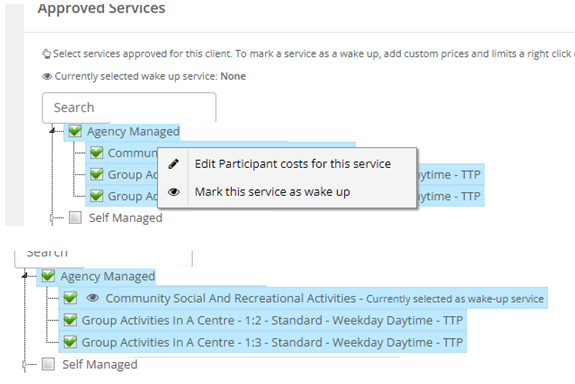
- In the approved services, you can right click on a service in the approved services and mark it is the service to use for wakeups overnight \n \n
 \n
\n
- Settings > App Settings
- Setting added that shows a Wakeup button in the app. If tapped on it prompts for number of hours then creates a support for Active Overnight. Client record must have a wakeup service selected (right click service and select Wakeup service)
- Setting added that allows workers to add individual kms for each client when ending a group support with transport.
- Setting added to restrict transport services to only those assigned to the participant instead of all when adding support via app.
- Setting added to stop CM inserting calculated kms if the worker does not add any via the app.
- Setting added that prompts for group attendance at the end of a support instead of at beginning.
- Renamed Show Case Note on End to Require Case Note on Support End
- Data
- Vaccinations
- Can add names of any vaccinations you would like to keep track of
- Cancel Codes
- You can now mark cancellation codes as Inactive. This will remove them as options when cancelling supports but leave historical supports with these cancellation codes as is.
- Worker logs
- You can now force a logout of app users. Please note that by forcing a logout, the worker will be logged out immediately. This means that there is a potential for information to be lost if the worker is in the middle of typing a case note or collecting signature/km information. We recommend that they ONLY use this as a last resort or if they are confident that the worker is not using the application.
- Vaccinations
- Vehicles
- Vehicle edit page reworked
- Admin
- Access Permissions
- Workers removed from this page as there are no worker permissions
- Service Organisations
- Service organisation page and services pages reworked
- Access Permissions
Bug Fixes:
- Reporting -> Accounts
- Participant Invoice – Total Cost invoice report adjusted to include cancelled but billable supports
- Supports -> All
- Inactive/Active filters weren’t always correctly filtering
- Participants -> Funding Information
- When removing HCP funding from a participant’s record, it will no longer states that it is going to delete everything.
- Properties -> Maintenance History
- If notes were too long, it would display server error. It now displays readable error so users know why it didn’t save.
App \n
Changes:
- Offline features
- can start or end supports and breaks and add case notes and signatures while the app is not connected to the internet
- these actions get added to a queue and the app will automatically try to send them once it reconnects \n
- The existing "add and edit support" setting has been split into two different ones for better control over adding supports via the app. You can now allow workers to add supports but not edit, or edit supports but not add.
- You can now only allow workers to edit availability after X days from today. For example, if you only want workers to be able to change availability after 2 weeks, you can set this to 14 days.
Bug Fixes:
- emails with incident reports sent from the app had the wrong time, but incident in CM itself had correct time
\