
8/6/21 Release Notes
The latest update has quite a few changes, we've created a video walking you through many of them |https://youtu.be/4KFFUwKZKzM
Approved Services Setting a participant's improved services can now be done directly from a participant's record instead of navigating through the 'Ciarr/Careplan' section, and can be selected through the use of tickboxes next to each service. You can also specify services at the Service Organisation level as well instead of having to select them one by one. Prices can still be set for services if desired by right clicking on a service and adding in further information.
Previously for services to be restricted, approved services needed to be added for all participants and a setting turned on. After the update, CareMaster will restrict services for a participant where ANY have been added for them with no need for the setting, meaning that if any approved services have been added for a client their available services are restricted immediately.
New service portal We have moved to a new Service Portal for ticketing and our knowledge base. The format will be different to what you're used to, but will be much cleaner and easier for everyone to use. There will be a new widget within CareMaster that can be used to access this easily in the bottom right hand corner, however you can still email the Customer Care Team as before. If there isn't an account attached to your login when you sign into CareMaster after the update you won't be able to search for help topics,
( Update - after May 2024 direct emails are not monitored - please log a support case through our Help Centre )
App Update
The App update is not yet available to be used, this will be updated for you in the near future after the completion of some further adjustments and testing. The new app was initially going to be available for download but unable to be used until the web portal update was complete. When able, we recommend trying this out for yourself and/or having some of your more technically proficient staff trial using the app initially before encouraging the rest of your staff to use it. There's no cut-off point for the current app and this can continue being used without interruption or issues, your workers can be using either the current one or the newer one as desired.
New Service Upload The new Service Upload functionality is much speedier at uploading new Price Guides, and will also accept the new xslx Price Guide format. Please note that after receiving the update you will only be able to upload this newer format, older Price Guides in the older csv format can no longer be uploaded.
Improved Xero Timesheets You can still send Xero timesheets the same way as you do currently, but there is now an Advanced page where you can see the timesheet information for a staff member much more clearly. It also takes overtime into consideration.
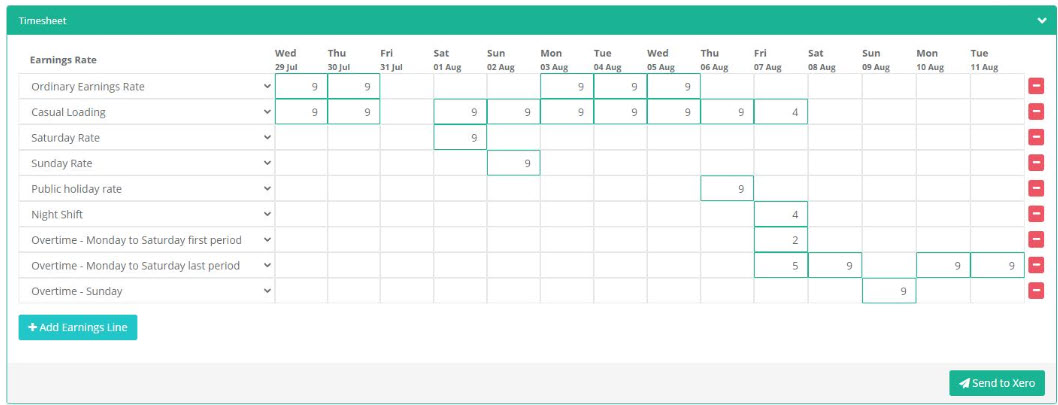
If you are interested in using this, please contact the Customer Care Team. This functionality is expected to be available as of July, alongside pricing information.
Break Timesheets Any break timesheets added for a worker will subtract those minutes from the total hours worked in Xero Timesheets.
Roster Functionality The various roster pages now include the ability to create supports, you can now click and drag supports around the roster to assign workers to supports more easily, and you can also display a worker's availability on a weekly or fortnightly view
Worker and Client Languages
These are now multi-select and you can use these in the Browse Worker popup to filter through workers of a specific language requirement.
Editing Timesheets
You can now edit a timesheet without updating the linked support as well, but there is still the option to update the attached support as well if desired.
Editing Recurring Supports
We have made a number of changes to editing recurring transactions with additional options for will and won't be updated when saving a recurring chain. You can indicate if changes to a recurring transaction include changing statuses, transport information and worker assignments.
Copying supports within an group
If you have a group support where the supports within the group have the same or similar details between the participants in the group, there's functionality so you can create multiple supports in the group for different participants without needing to enter in the same details multiple times.