
Data Overview User Guide
1min read
The Data section in CareMaster allows you to view/add/edit/delete options for certain fields and sections within CareMaster.
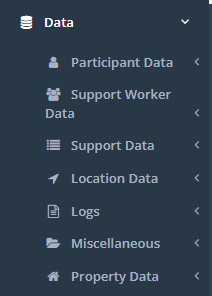
A list of the items in which you can view or customise within CM is below:
Participant Data
- Agencies
- Case Note Activities
- Case Note Categories
- Conditions/Disabilities
- Funding Payers
- Funding Types
- Goal Templates
- Incident Categories
- Non-Participant Profiles
- Participant Categories
- Participant Classification
- Participants Display
- Participant Document Categories
- Participant Leave Reasons
- Participant Link Types
- Profiles
- Space Types
- Treatments
Support Worker Data
- Qualifications
- Support Worker Categories
- Support Worker Display
- Support Worker Note Categories
- Timesheet Events
- Worker Document Categories
Support Data
- Blockouts
- Cancel Codes
- Support Display
- Support Note Categories
- Task Lists
- Transaction List Export
Location Data
- Address Tags
- Destination Categories
- Destinations
- Local Government Areas
- Region/Location
- Suburbs
Logs
- Current CareMaster Users
- Email Notification Logs
- Support Notification Logs
- Worker Logs
Miscellaneous
- Alert Display
- Custom Reports
- Genders
- Generic Document Categories
- Incident Severities
- Interests
- Letters
- Public Holidays
- Religions
- Vaccinations
Property Data
- Property Incident Categories
- Property Managers
- Property Types
\