
How to check over reported DEX data?
3min read
If you have completed your export from CareMaster to the DEX portal and you're wanting to check things over, here are a few things to note. Its assumed that you have completed the sync process according to the DEX reporting guide here: How to sync my data to the DSS DEX portal?
\
- Has it been less than 24 hours since your last sync? \n If so, any reports showing totals in the DEX portal may not have been updated yet. However the events themselves appear immediately in the DEX portal, you could check for a few events by searching for a case or client within the DEX portal. \n
- How can I check if events made it over to the portal ok? \n At the end of every sync you should be able to check with totals for anything that did or didn't make it across to the portal. If you're wanting to check further (which we recommend in any case) then you will want to log into the portal itself and look at the various reporting features there. We don't have access to the portal to assist you here at all, we only have access to send data across. \n
- The data in the portal isn't what I'm expecting. \n Are the totals just a bit off, or there are certain event types that don't seem to have made it to the portal? Regardless, taking screenshots or records of any reports telling you what the numbers are is generally a good idea as this will be needed to get assistance from support.
- CareMaster and DEX portal totals not matching up? \n There are 2 main things to be aware of when it comes to differences between CareMaster and DEX totals:
- Transactions with multiple workers have their totals multiplied by the number of workers, depending on the service type. For example, a 1 hour service that was provided to a client with 2 staff assigned will appear as 1 hour in CareMaster, and 2 hours in Client Central.
- Totals are rounded up. According to DEX transfer rules, when it comes to units of a service provided we can only send across whole numbers. This means that every individual total gets rounded up, for example a 2.5 hour service will be exported to the DEX portal as 3 hours. \n
- Can you single out a single event that didn't make it to the portal? \n It doesn't matter if you have a large amount of events that didn't make it to the portal, but if you can pinpoint a single example and trace it back from the start we should be able to find out where things stopped proceeding.
- In CareMaster into the record. In the payment tab, there should be section towards the bottom left. Depending on the event, it will look something like this. \n \n
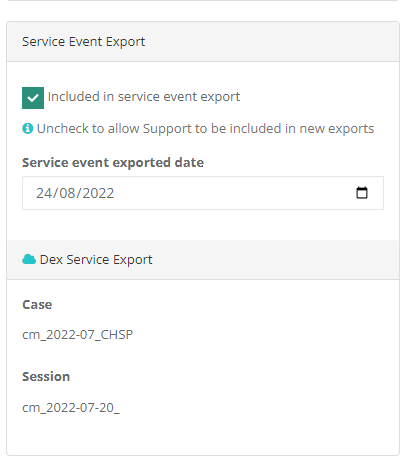
- If the 'Included in Service Event Export' is ticked, this indicates that it successfully included in a service export from CareMaster.
- If it is unticked, the event was never included in a service export. Make sure that the event is marked as Checked. \n
- In CareMaster into the record. In the payment tab, there should be section towards the bottom left. Depending on the event, it will look something like this. \n \n
- CareMaster and DEX portal totals not matching up? \n There are 2 main things to be aware of when it comes to differences between CareMaster and DEX totals:
- My totals still don't seem to be what I'm expecting? Grab a copy of any reports or data you can get of your numbers from the DEX portal. These can sometimes be in different formats, eg reporting on number of sessions instead of $$ or hour amounts. \n \n There's no one way to run a report for totals/data, but its recommended that you attempt to break down the totals where able, so you can see if events were sent over for February but not March (for example). Once you can pinpoint a specific example of an event that didn't come through, refer to the earlier step in this article regarding specific events not going through to the DEX portal.
\