
How to email a HCP statement to a client?
First you need to finalise the month for all clients or generate a single statement: see this article here for information on how to do this.
Once you have done this there are two places where you can email the statement.
From the HCP Funding → Participants page or a Client's Funding Information
If the Client has a generated statement, you can email the latest statement by clicking  followed by 'Email latest statement'.
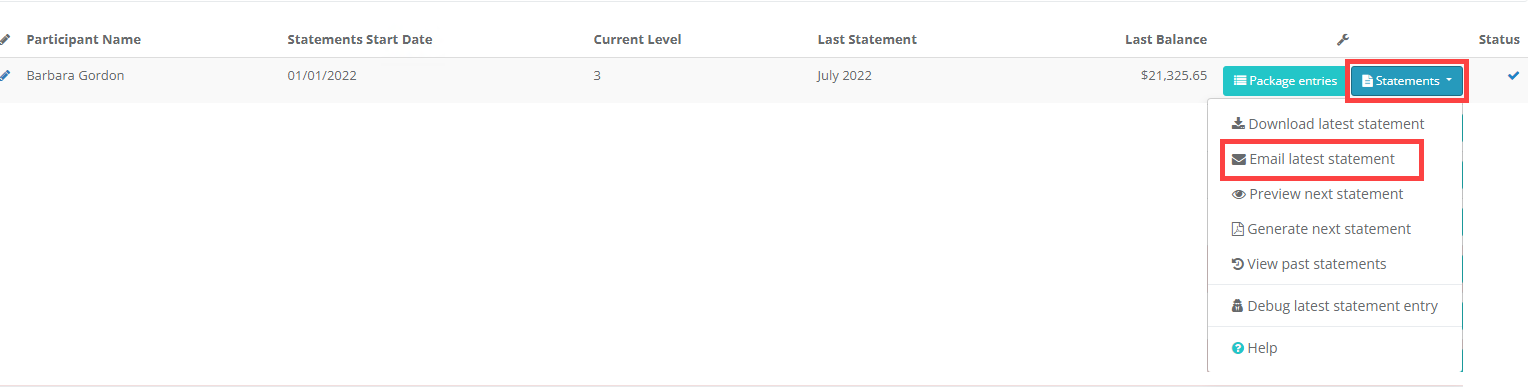
Alternatively you can select 'View past statements' and click the  next to a particular statement.


From the HCP Funding → Statements page
To email copies of the generated statements to the appropriate Clients, you should click the  button next to the desired month.
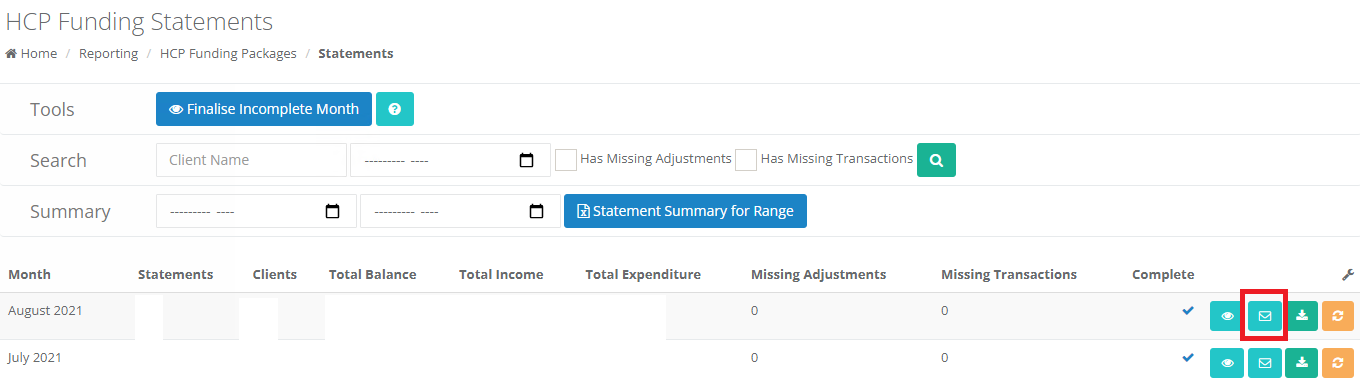 In the popup that opens, you can select the Clients you want to send emails to. The statement will be attached, with a short message to the Client. The Emailed column will show if the statement has been sent to the Client since it was generated or since it was last regenerated.
The emails are sent in the background, and you will be notified when they've finished sending.
| PLEASE NOTE:
Only clients with a valid email address can be selected or emailed to.
The statement will be sent to the client's primary email address along with any other email address marked as copy correspondence to.
| After sending, the statement will be marked as having been emailed. Statements that are regenerated will be unmarked, so you know they need to be sent again. |
|---|