
Unassigned Supports - Coordinators and Vehicles rosters views
This article outlines the changes to coordinator and vehicle roster views and the management of unassigned supports for coordinators and vehicles.
The key change in all roster views is the way unassigned supports are identified. Instead of focusing on whether a unassigned support is connected to a coordinator or a vehicle CareMaster will now check whether it is assigned to a worker across all the roster views.
Workers Roster View
Unassigned supports will be grouped together in a separate 'Unassigned' row. The unassigned supports will be the in first row visible in the Worker roster view.

Coordinators Roster View
Unassigned supports may or may not be linked to a coordinator. A row titled 'No Coordinator' displays the supports not assigned to a coordinator .

The table below outlines where the unassigned support will be displayed based on its connection to a coordinator and/ or a worker. Unassigned supports are highlighted in the coordinator view.
\
| Linked to Coordinator | Assigned to a Worker | Roster Display |
|---|---|---|
| Yes | Yes | In the allocated coordinator row |
| Yes | No | In the allocated coordinator row and highlighted as unassigned |
| No | Yes | In the No Coordinator row |
| No | No | In the No Coordinator row and highlighted as unassigned |
Vehicles Roster View
Similar to coordinators roster, unassigned supports may not be linked to a vehicle. A row titled 'No Vehicle' displays the supports not assigned to a vehicle.
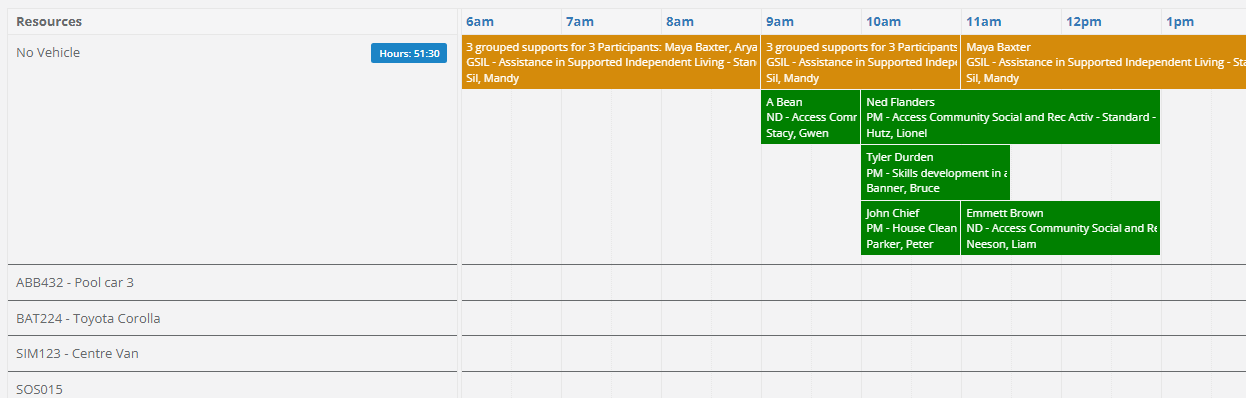
\
| Linked to Vehicle | Assigned to a Worker | Roster Display |
|---|---|---|
| Yes | Yes | In the allocated Vehicle row |
| Yes | No | In the allocated Vehicle row and highlighted as unassigned |
| No | Yes | In the No Vehicles row |
| No | No | In the No Vehicles row and highlighted as unassigned |
\