
What do the property reports show?
1min read
To access reports on the properties in your CM database, click on Reporting -> Properties on your side menu.
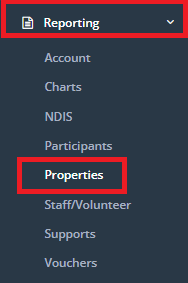
\n
Properties List
This report will export a list of all properties entered into the properties section in CareMaster and their relevant information.
Before running the report, you have the option of filtering depending on the results you wish to receive:
- Status - using the field provided select the property status you want to export for. If you leave blank it will export all.
- Location - using the dropdown provided select a Location to export a list of properties only assigned to a certain location. If you leave blank it will export all.
- Type – using the dropdown provided, select a property type to export a list of properties of only that particular type. If you leave blank it will export all.
- Manager - using the dropdown provided, select a property manager to export a list of all properties assigned to that manager. If you leave blank it will export all.
- **Export Format –**using the dropdown, select how you would like the export to be formatted:
- Excel – exporting to an excel document, allows you to edit the information that has been exported such as delete any unrequired fields that are generated.
- PDF – exporting to a PDF will not allow editing.
\
Property Maintenance History
This report will export a list of all property maintenance history for the date range selected.
In this report, you are able to enter in a single property or the report will generate for all properties.
In order the report to run; there must be information entered into the following filter:
- Start & End Date – use this area to enter in the Start and End Date that you would like to view in the report.
Before running the report, you have the option of filtering depending on the results you wish to receive:
- Property - using the field provided enter in the property name and select it from the drop down.
- **Export Format –**using the dropdown, select how you would like the export to be formatted:
- Excel – exporting to an excel document, allows you to edit the information that has been exported such as delete any unrequired fields that are generated.
- PDF – exporting to a PDF will not allow editing.
\