
Worker Run Sheet Report
Overview
CareMaster has implemented this functionality to enable organisations to inform workers of their scheduled supports. if the system experiences downtime.
If your organisation is interested in using this feature and incorporating it with the File Hosting Service DropBox. Please contact the Customer Care Team and they will inform you when the process below can begin.
Currently CareMaster only integrates with DropBox.
Workers Run Sheet Report
CareMaster can generate the workers run sheet report and store the report in DropBox. The report has been designed to provide information to workers regarding the Supports they have been rostered to. The frequency of the report is set to weekly.
The article below explains how to activate the settings to generate the report and how to complete the integration between CareMaster and the File Hosting Service.
Once these settings and integration are successfully initiated, CareMaster will automatically create the report and store it within the File Hosting Service. Users will have the ability to access the report if CareMaster is not accessible.
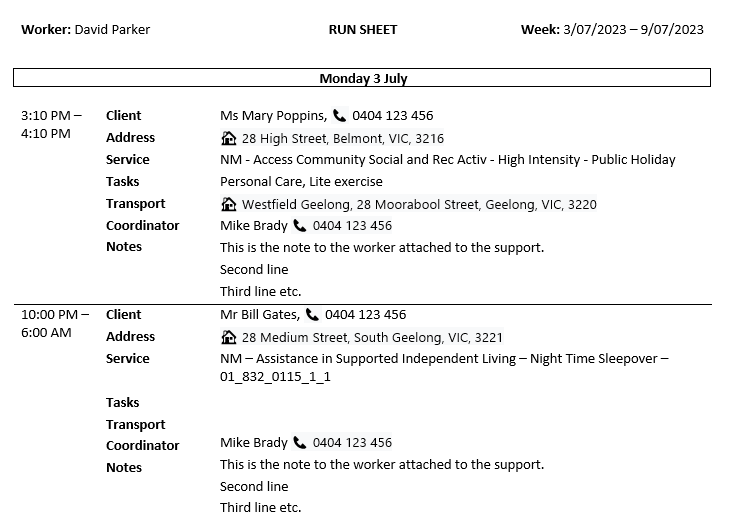
Below is an example of the worker run sheet.
1. Enable Runsheet Settings
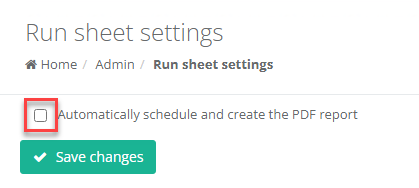
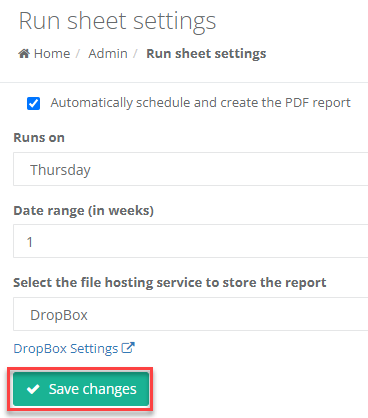
Go to menu: Admin> Run Sheet Settings
To activate the settings, tick Automatically schedule and create the PDF report.
Select the day of the week the report needs to be generated on. This could be the first of the week in your pay period.
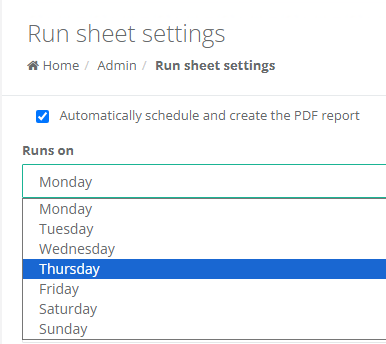
For example: If Thursday was selected, CareMaster will generate the weekly run sheet every Thursday morning. This sheet will encompass roster details spanning from Thursday to the following Wednesday. It will include any modifications made to the Supports, up until the report's creation.
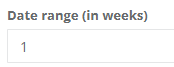
Set the number of weeks to be included in the report.
Select the File Hosting Service.
Save the changes
2. File Hosting Services Integration
To complete the integration between CareMaster and the File Hosting Service - DropBox
Go to menu: Admin> Integrations> File Hosting Services> DropBox
Enter the DropBox login details to complete the integration.