
How to create a new client record from a My Aged Care client record snapshot?
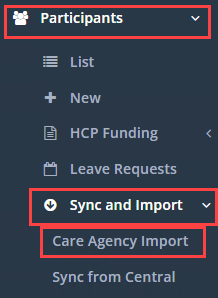
To create basic client records from a My Aged Care client record snapshot, you must be logged in as an administrator user and go to Participants → Sync and Impost → Care Agency Import.
Click on Browse to select up to 20 My Aged Care Client Record Snapshots, these will be in RTF format.


Once you have selected all the files you want to import, click on Upload and Review.

CareMaster will go through and map the first page of the client record snapshot. If there are issues with one of the files, it will display in red and inform you it cannot import the file. You will need to create the client record manually, for information on this click here: How To Create A New Client/Participant.

Otherwise, files without issues will show in green with a summary of the client data it found. If it looks correct to you, click on Import to create the client records for those files where it could grab the client information.

These clients will get inserted with a Waiting status. To find their record and add more information, click on the Waiting tab in the Participant list page.

\